
Setting Up Monthly, Yearly & Recurring Limits with Shopify Flow
Want to limit customers to 1 purchase per month, or 3 per year? Use these Shopify Flow templates to set up recurring limits in minutes.
Shopify Flow is free on all paid Shopify plans. Flow is included at no extra cost with Basic, Shopify, Advanced, and Plus plans. It is not a Plus-only feature.
Common use cases
Here's what merchants typically set up:
| Use Case | Example | Reset Schedule |
| Monthly subscription box add-ons | "Add up to 2 extra items per month" | 1st of each month |
| Yearly member benefits | "VIP members get 5 free items per year" | Every 365 days |
| Weekly fresh product limits | "Max 1 lb per customer per week" | Every Monday |
| Quarterly employee discounts | "Staff can purchase 3 items per quarter" | Every 13 weeks |
Quick checklist
Before you start, make sure you have:
- Shopify Flow — included free on all paid Shopify plans (Basic, Shopify, Advanced, Plus) — get it here
- A customer purchase limit rule — create one first if you haven't already
- Your Rule ID — here's how to find it
Shopify Flow templates
Choose the template that matches your reset schedule. Each template uses the Scheduled time trigger with the DC Order Limits → Reset customer purchase limit action.
Daily reset
- Frequency: Days
- Repeat every: 1 day
- Time: 12:00 AM
- Action: DC Order Limits → Reset customer purchase limit → [Your Rule ID]
Weekly reset
- Frequency: Weeks
- Repeat every: 1 week
- Day: Choose your reset day (e.g., Monday)
- Time: Choose your preferred time (e.g., 12:00 AM to reset at the start of the day)
- Action: DC Order Limits → Reset customer purchase limit → [Your Rule ID]
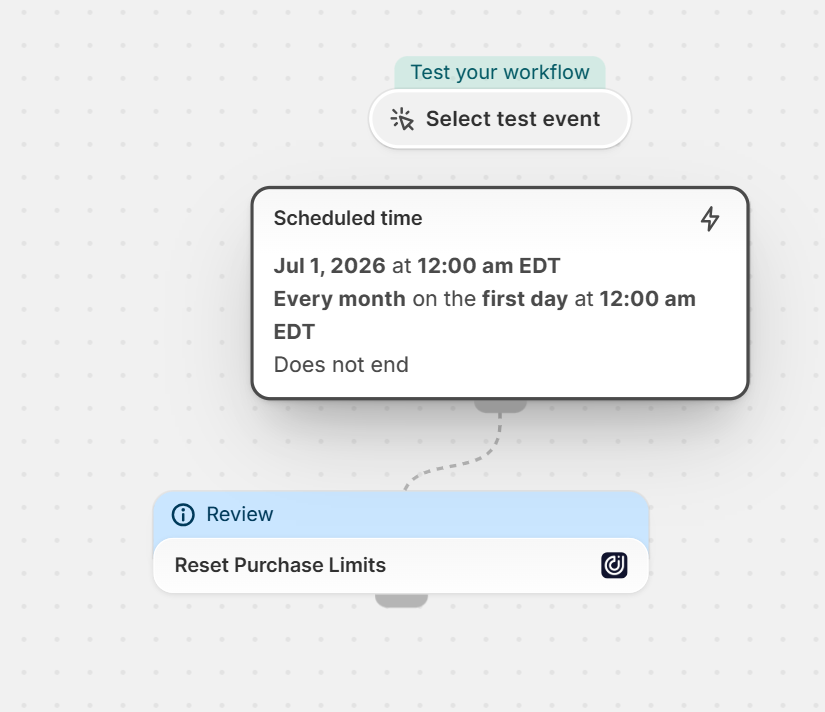
Monthly reset
- Frequency: Months
- Repeat every: 1 month
- Day of month: Choose your reset day (e.g., 1 for 1st of month)
- Time: Choose your preferred time
-
Action: DC Order Limits → Reset customer purchase limit → [Your Rule ID]
Quarterly reset (~every 13 weeks)
- Frequency: Weeks
- Repeat every: 13 weeks
- Day: Choose the weekday matching your start date
- Time: Choose your preferred time
- Action: DC Order Limits → Reset customer purchase limit → [Your Rule ID]
Note: 13 weeks is approximately one quarter, but won't align exactly with calendar quarters (Jan 1, Apr 1, Jul 1, Oct 1). See "Exact calendar dates" below for precise quarterly resets.

Yearly reset (~every 365 days)
- Frequency: Days
- Repeat every: 365 days
- Time: Choose your preferred time
- End date: Leave blank
- Action: DC Order Limits → Reset customer purchase limit → [Your Rule ID]
Note: 365 days is approximately one year, but leap years may cause the date to shift over time. See "Exact calendar dates" below for precise yearly resets.

What to know
- Limits reset to zero — unused allowances don't roll over to the next period
- Pick a quiet time — schedule resets during low-traffic hours to avoid mid-purchase confusion
- One Flow per rule — if you have multiple limit rules with different schedules, create a separate Flow for each
For detailed step-by-step setup, manual resets, or troubleshooting, see the full guide.
Need help?
Contact us at hello@dashcheckout.io if you need assistance setting up your recurring limits.